ADA sort of lives on in that VHDL, one of the two main hardware description languages used to design digital logic, is based on ADA syntax and semantics. I prefer Verilog myself, but VHDL is very popular in Europe.
On your desk? The 9 track tape drives I remember were floor-standing units as big as a refrigerator.
I “stopped supporting Windows” (helping friends and family) about a decade ago. I’ll put a windows image on there for them, but that is as far as I’ll go.
I’ll use a derivative of WINE or a VM when I’m desperate.
1 Like
Am I the only one here who still likes Windows and uses it as his primary desktop OS?
Sure, I also use MacOS and FreeBSD, but most of my usage is Windows. Perhaps it’s because I’m not afraid to edit the registry to enable and disable things others find offensive about windows.
I’ve done that, and I don’t want to do it again lol. I want a machine that just does what the f i tell it “out of the box”
so my friend wrote this script to help automate the running of his popular minecraft server…and I don’t know exactly what he did but somehow it got set up to just catch every error and ignore it…one the things the script would do was:
- change the working directory to the “backup” folder
- run “rm -rf *” (or whatever)
- make a new backup
then he decides that since most of the other directories start with a capital letter, he renames the folder to “Backup” …
final icing on the cake: the script is executed from the root directory as root
I find it extremely annoying that companies such as Microsoft and Apple shall decide what my preferences for e.g. a UI are supposed to be. They hide and obscure options to personalise the user experience instead of e.g. enabling them through an “advanced” section of the user preference settings. A couple of trivial examples: Make Caps-lock an additional Ctrl button; focus follows mouse. These are essential user experience issues that are some of the very first I set up when I have a new Linux installation. Both can be set up in Windows by registry editing. Thus, Windows is capable of it, but for some unfathomable reason, Microsoft has decided that the user is not supposed to have access to these options. I seem to remember that you can (or could) set up the Caps lock as Control on MacOS, but the focus follows mouse breaks certain assumptions of the MacOS GUI, so it is not advisable to set it up there. And for W11, you have to actively search for loopholes to make local user accounts (and Microsoft actively close these loopholes). And you have to make an effort to get rid of f*ng OneDrive. I’ve also read several reports on people getting passive-aggressive mails from Microsoft if they’ve set up a local pi-hole or similar to stop telemetry going back to MS. It should be up to me (and only me!) if I want to use OneDrive or not. It is not up to Microsoft to more or less FORCE me to use it. I just don’t want that shit, and I hate that kind of shitty behaviour.
Like the big ones omnipresent in TV sci-fi shows of the 1960s to signify that a particular mass of blinkenlights was a computer – I know.
This was around 1995 or so, it laid flat like a giant reel-to-reel tape recorder. Self-threading. Came with an ISA card as PC interface.
Here is the reason I want this option. Take a look at the left part of this keyboard for HP 9000/300 series Unix workstations (one of my favourite keyboard layouts ever):
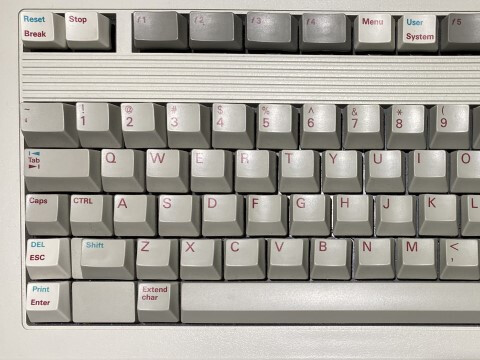
Notice the location of the Ctrl and Caps lock keys. The Ctrl key is located directly to the left of the A key, making it very easy to reach without moving your fingers away from the home row when touch typing. At the same time, the less frequently used Caps lock key is still easily available for the same reasons, but it is moved out of the way so as not to interfere with the Ctrl key. A very sensible layout, in my opinion. As a side note, the escape key is at the lower left, which is also sensible if you use an editor such as vi or vim, but also makes sense because it is relatively easy to reach when touch typing.
Edit: Anoter example: Here is the layout of the keyboard from the original IBM PC from the 1980s:
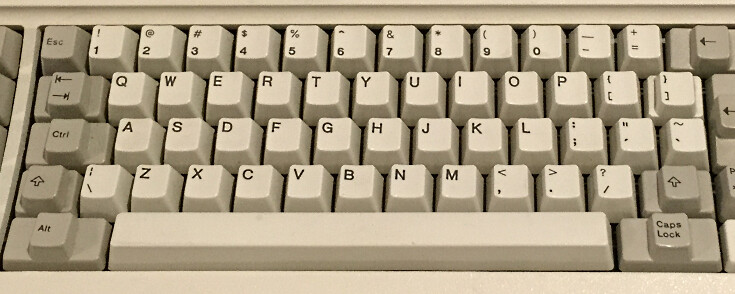
Notice that the Ctrl key is in a sensible position, namely to the left of A.
Contrast this with modern standard layout:
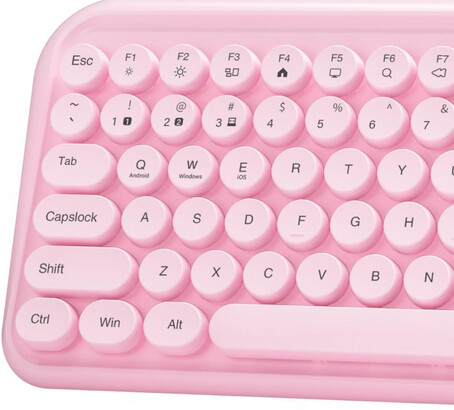
Here, the Caps lock key is big with an easy-to-reach position, giving the impression it is a very important and often-used key. The Ctrl key (which you will often use with shortcuts in most software packages) is relocated to the lower left. Thus, when touch typing, the Ctrl key location forces you to lift your fingers on your left hand from the home row (ASDF and JKL; for US layout) to press Ctrl, thus breaking the typing rhythm. And I’m certainly not alone thinking this. For this very reason, many (if not most) Linux desktop environments include at least some of the following options (screenshot from the advanced options section for keyboard settings int the KDE desktop environment):
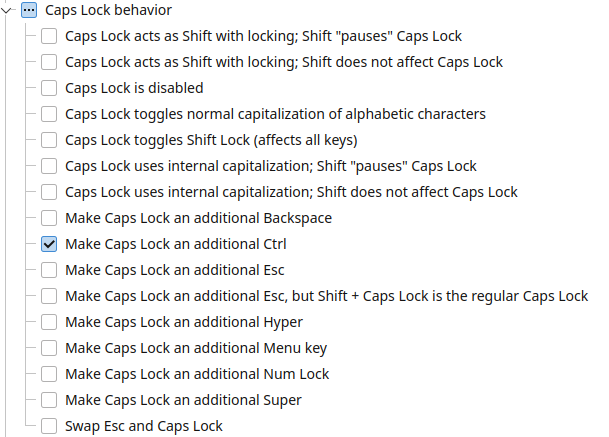
And that’s how you do it. Let the user be in control instead of forcing the user to obey nonsensical decisions.
1 Like
If anyone is thinking they might need to upgrade or replace their computer systems in the next year or two, it might be a good time to pull the trigger before prices go way up.
Memory and GPU prices were already set to skyrocket this year, and increases have already begun. But now it looks like hard drives may be in short supply, as WD’s entire output for the year is already sold out.
I don’t personally own any hard drives but I would expect this to put upward pressure on cloud service pricing and everything that depends on it.
Yet another thing to blame on AI.
1 Like
So now we just lean back and wait for the AI bubble to burst… 
1 Like
I hope it happens soon. AI is sucking up RAM, FLASH, hard drives at a monumental rate, and is consuming massive amounts of power, leading to increases in electric rates. If this keeps up, personal computer prices are going to skyrocket or become hard to find as manufacturers cannot get parts to build them in sufficient quantities to meet demand.
Edit: I forgot about GPUs. AI is sucking up so much of Nvidia’s production that GPU boards have skyrocketed in price too.
I guessing it is over invested (“AI”), but we probably won’t know for quite a while.
Python would be my preferred programming language (when I do, which isn’t often), but I’ve yet to meet a Linux distro that beats Windows (and trust me, I’ve tried real hard).
UK Atheist
That of course depends on your usage (which is why I wrote “depending on context”). For me it’s the opposite; I have yet to find a Windows version that beats a decent Linux distro (and trust me, I’ve tried).
I was gonna reply to SodaAnt, but this is even more relevant to me.
The VIC20 was my very first personal computer (purchased late 1983)… I graduated through various machines from that including a Commodore 16 until I was eventually gifted an Apple IIe. I sold that for £500 and bought an Amstrad PC1512, started upgrading that and moved ever upwards along the DOS, Windows/NT path and I’ve never really looked back until recently. My degree in Applied Biology and my experience in computers was what got me a job in pharmaceuticals company, Wellcome Research (now deceased but I loved their basic philosophy at the time) and set me onto a path in computer programming and then in computer/server support.
Nowadays, as MS continues down its “agentic” path, I’d like to ditch Windows, but I just find it so damned comfortable and easy to use.
UK Atheist
For me, it’s a no brainer… while Linux represents a kind of “real computing” concept to me, every time I try using it I end running back to an OS on which I can actually do the things I want to. I’d really like to ditch Windows, but the learning curve is just too great, so for now, it’ll just have to remain on my server and test machines.
UK Atheist
Well, that goes both ways — whenever I try to use Windows, I run back to Linux to get things done.
Some of the reasons are, in random order:
- With my DE of choice (KDE), I can customise quite a lot more than I can on Windows without having to resort to registry fiddling. And the available options in Windows have been culled ruthlessly. It was bad on W10, but almost unbearable on W11.
- I dislike strongly the planned obsolesence you get with Windows. In contrast, Linux runs flawlessly on old hardware. In fact, over the last year or so, I’ve bought a small handful of cheap second-hand computers that couldn’t be “upgraded” to W11 from Windows people that just wanted to get rid of them. I’ve set them up with Linux and put them to good use.
- I am accustomed to/ the software available for Linux, so I just get frustrated whenever I try to use Windows software.
- I prefer to tell the system what I want it to do, and I dislike systems that tell me how to do things or act as golden handcuffs regarding what I can do, and how.
- Function is more important than appearance. UI usability trumps lots of pretty icons and fancy animations (which I hate anyway) implemented to impress the user. Not that I like the looks of Windows anyway…
- The designs, quirks, and limitations of the Windows file system(s) have been an endless source of frustration for me.
- Lockin to the Microsoft ecosystem by design, e.g. by very limited support for non-Windows file systems and file formats.
- Inconsistent Windows user interface (among other things, keyboard shortcuts and names of directories change depending UI language). And good luck getting an Excel sheet produced on an installation with a different language/locale to work without lots of sweat and tears.
Really, the best feature of Windows in my opinion is that you (given hardware compatibility) can get rid of it by installing Linux over it.
If I’ve been exaggerating, it’s not by much.