Ick! I don’t think I could tolerate this. I want to be able to select what window has keyboard focus explicitly rather than rely on where the mouse pointer happens to be. I often don’t look at the screen while typing (when I code I write pseudo code on paper and translate that into C or some other language as I type), and with a system set up with focus following the mouse I’ll look back at the screen and find I’ve been typing text into some other window because I inadvertently bumped the mouse (this is also why I always disable the trackpad on a laptop). With that said, I still like to be able to scroll the content of a window using the mouse wheel by just moving the mouse pointer into a window without having to click in it.
For most setup things, I do it in rc files, such as .cshrc (I’m a Berkeley grad, so I grew up using stuff created there, like csh and vi). I much prefer the simplicity of plain text setup files rather than the Windows registry. I keep my preferred settings under source control with git (and backups on GitHub), and that’s hard to do with the Windows registry.
This is especially convenient if you e.g. have two windows side-by-side with a mouseclicky interface. Just move the mouse cursor and click. No extra click to activate the windows. Need to press control-c in the terminal window with only a little strip visible behind other windows? Move the cursor to the window and press ctrl-c, no need to click it so it pops up to the top, and you have to click in that other window again to get it to the top. As for me, once I tried focus follows mouse, there was no way back. I have done registry hacking on Windows computers to enable this, but sometimes it confuses Windows. Linux not so much. Also the mapping of caps lock to control(*) is something I cannot live without. Once you get used to it, there is no way back.
(*) The “modern” PC style keyboards with caps lock to the left of A is one of the most idiotic layout decisions ever. That, and {, [, ], and } on AltGr-7, 8, 9, and 0 on international keyboards. It’s a pain in the arse for programmers. That’s why I use US layout for programming.
I learned to type on an IBM Selectric typewriter, and that has the caps lock key just to the right of the “A” key, so I’m used to it. I use caps lock when I’m typing long macro names, which are usually in all-caps.
When I’m just typing text (like when writing emails and documentation) as opposed to coding, I’ll remap the keyboard to Dvorak and use that layout as I find it more efficient.
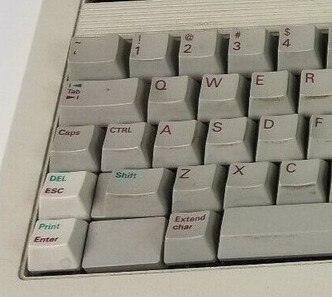
Yeah, I can understand that. I, however, learned touch typing on a UNIX keyboard for HP 9000 series workstations, which had Ctrl to the immediate left of A, and caps lock to the left of control. ESC was in the lower left, perfect for use with vi (see image below). This is probably the best keyboard layout I have ever encountered.
Edit: When setting caps lock up as an extra control key on Linux DEs, one can still enable caps lock functionality by pressing both shift keys at the same time. To switch caps lock off, press ONE of the shift keys.
That does look like a more logical layout, however it’s difficult to overcome decades of muscle memory. Fortunately, I have long, skinny fingers, which make it easy to reach the escape key in its usual location at the upper left of the keyboard.
Microsoft has started requiring that OEMs like Lenovo put a Copilot key on their keyboards if they want some kind of certification Microsoft offers. This key replaces the Ctrl key on the right side of the keyboard and it does nothing if you’re running a non-Windows OS like Linux.
The key can be mapped back to right-Ctrl, but that Copilot logo will still always be on that key.
Yes, I have started seeing the full effects here. Most useless idea ever. I haven’t talked to anyone thinking it’s a good idea. Not even those at work actually using Copilot. There should be a market for black, non-transparent labels with “Ctrl” on them…
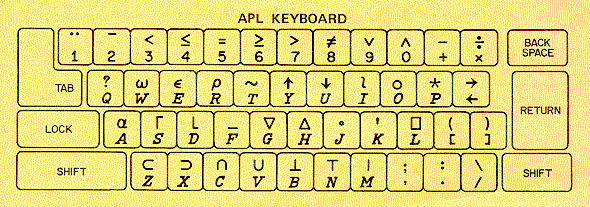
Edit: it’s an even worse idea than programming language specific keyboards (or more specifically, APL), as back in the 1960s keyboards were not yet standardised.
Edit: Although .rpm-based, there is Asahi Linux, which is a Fedora remix, and is supposedly tailored for Mac hardware. I’ve never tried it, and don’t know much more about it other than that I have seen in mentioned quite often in distro discussion.
Cinnamon does have a slicker front end with a few more bells and whistles. I tried MATE and Cinnamon in VMs before I went physical with it and found MATE ran faster as a rule. Granted, it’s just the GNOME2 DE, but it doesn’t require hardware acceleration, so it is smoother in a VM.
Sort of like XP versus W11…but not quite as pronounced…
Appreciate the advice, guys. It looks like in recent years Debian doesn’t compare poorly anymore to Ubuntu for ease of installation and I do like the emphasis on performance and stability and don’t mind the slower release cadence at all.
I would probably be fine with gnome or mate, but will probably start with Cinnamon since I probably have more muscle memory for Windows than MacOS (though admittedly Windows Server, which is more minimalist than e.g. Windows 11).
This will also be my first test spin with UTM. I have VMWare and Win11 licenses on my Mac Studio, but really don’t want to shovel any more $ at either …
MATE would likely be a smoother experience. I have setup VM’s on a MAC, and found that 3D hardware acceleration can be squirrelly in UTM. MATE uses 2D rendering, so it avoids that bottleneck.
I went with Virtualbox and found it works like a charm for anything I threw at it. The last time I used VMWare it seemed to be suffering from a slight case of bloatware…but I do miss the old free P2V utility…
Perhaps technically smooth, but definitely not smooth in terms of user friendliness and user satisfaction. I tried Debian 13 in a VM under KVM now, with MATE. And it’s just like standard Gnome DEs. The only redeeming feature is that it has a task manager bar. Other than that: Lke with Gnome, I won’t touch MATE unless there are no other choices.